
If you’re building a location-based app — delivery, logistics, real estate, agriculture — at some point you’ll hit the wall every indie dev hits: map API costs. Google Maps, Mapbox, and most managed providers charge per tile load or per API call, and that bill scales exactly as fast as your user base does. That’s the wrong direction for a bootstrapped product.
The alternative is running your own vector tile stack. It sounds intimidating, but with Docker it’s a weekend project, not a month-long infrastructure slog. This is the setup I run in production, and every gotcha below is something that actually broke on me first.
Why self-host tiles at all
Before the how, the why — because self-hosting isn’t free, it’s a trade of money for maintenance:
- Cost: a single small VPS can serve tiles for an entire regional user base indefinitely, versus a metered bill that grows with usage.
- Data control: you’re not sending every user location ping through a third party.
- Customization: you control the exact style, POI icons, and label rendering — no fighting a vendor’s style editor.
- Offline-friendly: self-hosted tiles pair naturally with offline-first mobile apps.
It’s the wrong call if you need global coverage on day one, or if ops isn’t something you want to own. But for a regional app, it’s usually the better trade.
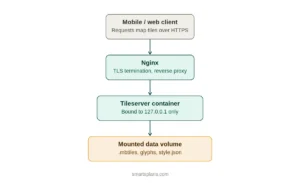
The stack
- Docker + Docker Compose — everything runs in containers, nothing touches the host directly
- A tile server (e.g., tileserver-gl or martin) serving
.mbtilesor PostGIS-backed vector tiles - Nginx as reverse proxy and TLS terminator
- A style.json file defining how the map looks, following the MapLibre Style Spec
Step 1: Get your source data
Download an OpenStreetMap extract for your region (Geofabrik is the standard source) and convert it to .mbtiles using a tool like tilemaker or planetiler. This step can be memory-hungry — more on that below.
Step 2: Docker Compose setup
version: "3.8"
services:
  tileserver:
    image: maptiler/tileserver-gl
    restart: unless-stopped
    volumes:
      - ./data:/data
    ports:
      - "127.0.0.1:8080:8080"
    command: ["--config", "/data/config.json"]

  nginx:
    image: nginx:alpine
    restart: unless-stopped
    volumes:
      - ./nginx.conf:/etc/nginx/conf.d/default.conf:ro
      - ./certs:/etc/nginx/certs:ro
    ports:
      - "443:443"
      - "80:80"
    depends_on:
      - tileserver
Keep the tile server bound to 127.0.0.1 only — never expose it directly. Nginx is your only public-facing surface, and that’s where you handle TLS, rate limiting, and caching — see the full Docker + Nginx reverse proxy setup for the details.
Step 3: The glyph gotcha that will cost you a day
Here’s a bug that’s easy to ship without noticing: if your style.json points to a demo or third-party glyph URL (common in copy-pasted starter styles), your map will render perfectly in browser testing — and then silently drop all text labels on mobile devices. No error, no crash. Just empty label space where street names should be. This deserves its own deep dive, but the short version:
The fix is to self-host your glyphs (PBF font files) alongside your tiles, and double-check the exact font family name in your style matches what you generated — a mismatched name (even a subtle one, like using a generic name instead of the specific weight your glyph set was built with) fails silently instead of throwing an error. Test label rendering on an actual mobile device, not just desktop Chrome, before you consider this done.
Step 4: Sprite sheets for POI icons
If your app shows custom icons — delivery points, stops, landmarks — build a sprite sheet rather than loading individual images per marker. Generate it at both 1x and 2x (32px/64px) so it renders sharp on high-density mobile screens. Keep your source SVGs around; you’ll be back to add icons later.
Step 5: Don’t skip swap space
This is the fix nobody mentions until they hit it: tile generation and heavy style processing on a small VPS (1-2GB RAM) will get OOM-killed mid-job with zero warning in your application logs — you’ll just see the process vanish. Before you debug anything else, add swap space:
fallocate -l 4G /swapfile
chmod 600 /swapfile
mkswap /swapfile
swapon /swapfile
It’s not a performance fix — it’s the difference between a job that completes and one that silently dies.
Step 6: Routing (optional, but often needed alongside tiles)
If your app needs directions, not just a static map, OSRM is the self-hosted equivalent for routing. It runs as a separate container, and if you have different vehicle types (car vs. truck, for example), you can run multiple OSRM instances on different ports with custom routing profiles — each bound to localhost and proxied through the same Nginx layer as your tiles.
What this actually costs
A modest VPS (4GB RAM, a few CPU cores) comfortably serves tiles and routing for a regional app — see this comparison of VPS providers if you’re choosing where to host it. Compare that to a metered per-tile-load API bill at real user volume, and the math tends to favor self-hosting once you’re past the earliest prototype stage — as long as you’re willing to own the ops.
Where this goes wrong
Every point above is a mistake I made once. The pattern is consistent: none of these failures throw a clean error. Silent label failures, silent OOM kills, style mismatches that “just don’t render.” Self-hosting maps isn’t hard, but it rewards being paranoid about testing on real devices and watching your logs closely in the first few weeks.
If you’re building a location-based product on a budget, this setup will get you further than you’d expect from a single small VPS — you just have to survive the first round of silent failures.
Pingback: OSRM Routing Self-Hosted: Car And Truck Profiles On A Budget VPS -
Pingback: Fixing Silent Glyph/Font Failures In MapLibre Styles (a Debugging Story) -
Pingback: 5 VPS Providers Compared For Indie Devs (Hetzner Vs DigitalOcean Vs Contabo) -
Pingback: Swap Space And OOM Kills: Surviving Heavy Processing On A Small VPS -
Pingback: Self-Hosted Vs SaaS: When It Actually Makes Sense To Run Your Own Infra -